Visual marketing is the ultimate driver of conversions in modern e-commerce and print-on-demand (POD) marketplaces. For years, web-based tools like Smartmockups served as the default standard for quickly mapping flat designs onto digital lifestyle imagery. However, as web tools increasingly lock high-resolution, watermark-free exports behind restrictive and expensive monthly subscription walls, digital creators are shifting their focus toward standalone software alternatives.
Enter PixWrap, a powerful, free-to-use desktop application optimized for Windows PCs. Built to challenge traditional cloud-hosted subscription platforms, this application shifts the entire rendering process directly to the user’s computer. The following comprehensive breakdown explores the structure, mechanics, advantages, and operational reality of PixWrap, establishing why it has emerged as a premier tool for digital creators. [1, 2]
What is PixWrap?
PixWrap is a dedicated offline desktop mockup generator and wrap creation application developed explicitly for online merchants, digital artists, and print-on-demand sellers. Unlike mainstream cloud-dependent platforms, it runs entirely on local system hardware. [2, 3]
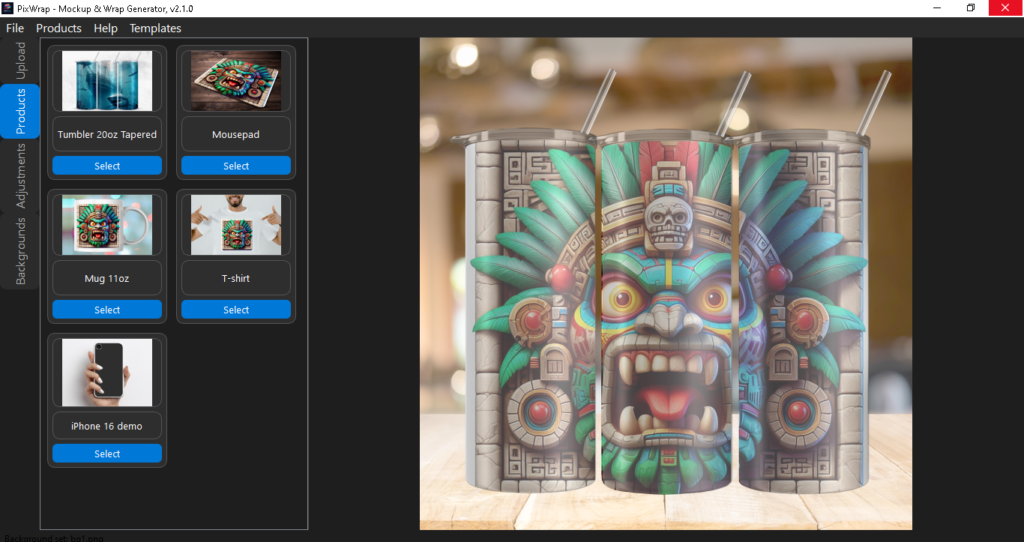
The primary utility of the software resides in its dual-purpose engine: it simultaneously maps a flat 2D graphic file (such as a standard PNG or JPG) onto realistic 3D product representations while rendering exact, production-ready full-wrap export layouts. This approach solves two critical issues at once—generating clean marketing assets for front-end digital storefronts and producing accurately proportioned files for manufacturing equipment or back-end POD fulfillment suppliers.
Architectural Comparison: PixWrap vs. Smartmockups
| Feature Metric [2, 4] | Smartmockups | PixWrap |
|---|---|---|
| Deployment Model | Cloud-based / Web Browser | Local Desktop Application (Windows) |
| Internet Dependency | Continuous Online Connection Required | 100% Functional Offline |
| Pricing Structure | Recurring Monthly/Annual Subscription | Free Forever App with Individual Premium Template Add-ons |
| Data Privacy | Images Uploaded to Third-Party Servers | Files Stay Local; No Cloud Tracking |
| Rendering Constraints | Subject to Server Load and Bandwidth Caps | Uses Local GPU/CPU Power for Instant Loads |
| Production Utility | Marketing Image Generation Only | Dual Output: Visual Mockup + Print-Ready Wrap File |
Core Features and Native Capabilities
1. Zero-Cloud Local Architecture
The defining characteristic of PixWrap is its complete independence from cloud services. Users do not need an active internet connection to customize templates or export final assets. This structural design guarantees data privacy, as copyrighted designs never pass through external company servers. Furthermore, it removes upload lag, enabling users to swap high-resolution artwork instantly without waiting for progress bars. [2]
2. High-Resolution 300 DPI Exports
Web-based mockup tools routinely downsample image outputs on their free tiers to conserve server bandwidth. PixWrap bypasses this restriction by utilizing the native rendering power of the host PC. It delivers crisp, print-standard 300 DPI exports directly out of the box. This degree of fidelity ensures that generated mockups remain free of pixelation when zoomed in on high-resolution displays or when sent directly to a physical print bed.
3. Smart Image and Proportional Handling
The software integrates intelligent aspect-ratio mapping controls. Whether a creator imports a square, vertical, or horizontal design file, PixWrap automatically handles asset orientation without distorting or stretching the underlying image. This eliminates the need to pre-format artworks inside separate editing suites like Adobe Photoshop before generating a mockup.
4. Interactive Visual Mockup Editor
The built-in configuration viewport provides immediate visual feedback. The tool utilizes specialized sliders to modify asset attributes dynamically:
- Live Preview Updates: See lighting, wrap contours, and color adjustments happen in real time.
- Scale and Position Sliders: Fine-tune precisely where a logo or full wrap rests on a physical object.
- Opacity and Blend Control: Seamlessly match the intensity of the design layer with the native shadows and reflections of the product surface.
- Integrated Background Selection: Swap out scenes instantly with built-in contextual backgrounds styled specifically for each product type.
Supported Product Mockup Categories
PixWrap provides a structured library of physical product templates, focusing on highly requested items across top global marketplaces:
- 🥤 Tumblers & Drinkware: Specifically built to generate full 3D cylinder wraps. It easily handles complex conical distortions for products like 20oz skinny tumblers. [5]
- 👕 Apparel & Garments: Provides standard t-shirt and hoodie configurations alongside trendy flat-lay arrangements for modern fashion brands.
- 📱 Smart Devices & Accessories: High-fidelity templates for modern phone cases, tech shells, and custom mousepads.
- 🖼 Wall Art & Home Decor: Contextual room environments featuring frames, canvases, and posters with accurate indoor lighting layers.
- 🏙 Commercial & Outdoor Displays: Large-format outdoor billboards and signage templates aimed at commercial marketing presentations.
Clarifying a Common Misconception: The Truth About Batch Generation
When assessing alternative design software, users frequently look for automated background workflows like mass batch generation. It is important to set clear expectations regarding PixWrap’s current capabilities in this area:
⚠️ Fact Check: Batch Generation Status
Contrary to some online rumors or third-party blog claims, PixWrap does not feature an automated bulk or mass batch generation system.
The software operates on an explicit single-design workflow layer. Each design file must be manually imported, scaled, and configured within the visual mockup editor on an individual basis. While the streamlined user interface allows creators to cycle through individual steps in mere seconds, users looking to import hundreds of design files to bulk-export thousands of permutations simultaneously with one click will find that this functionality is currently unsupported.
The Monitization Model: Truly Subscription-Free
The most significant barrier when dealing with mainstream mockup platforms is the recurring financial commitment. PixWrap operates on a different, customer-first pricing philosophy:
- Free Forever Application Tier: Downloading and executing the base engine requires no financial input, registration forms, or credit card configurations.
- No Mandatory Subscriptions: Users are never locked into recurring monthly fees.
- A La Carte Premium Assets: The software includes an array of built-in free templates. If a business requires highly specialized, niche commercial layouts, premium templates can be unlocked individually as a one-time purchase. You pay exclusively for the exact visual assets your business needs. [1, 4, 6]
Step-by-Step Workflow Guide
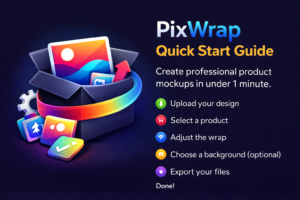
Creating digital marketing materials with PixWrap follows a straightforward four-stage pipeline:
[ Step 1: Drag & Drop Design ] ──> [ Step 2: Select Base Template ] ──> [ Step 3: Refine Sliders & Backgrounds ] ──> [ Step 4: Export 300 DPI File ]
Step 1: Import Artwork
Launch the desktop program and drop your target PNG or JPG file straight into the interface workspace.
Step 2: Choose Product Layout
Navigate through the template sidebar menu. Select your intended physical product format (e.g., a ceramic coffee mug, an iPhone cover, or a canvas print).
Step 3: Adjust Positioning and Scenes
Utilize the built-in control sliders to alter the scale and positioning matrix. Toggle through the built-in context backgrounds to change the setting from a clean, minimalist studio look to a lifestyle environment.
Step 4: Final Output Export
Click the export function to save your project locally. The software outputs a web-ready, high-resolution product showcase image for storefronts like Etsy or Shopify, alongside a production-ready template file optimized for direct printing workflows.
Target Audience: Who Benefits Most?
Because PixWrap relies on local execution and avoids steep subscription paywalls, it is tailored for distinct segments of the digital economy:
- Etsy Store Owners: Perfect for creators listing custom goods like drinkware and prints who need high-converting, realistic product photos without eating into their margins.
- Independent POD Entrepreneurs: Solopreneurs working with production platforms who want clean promotional assets quickly.
- Digital Pattern & Graphic Designers: Artists looking to showcase how their seamless textures or complex illustrations look on physical products for portfolio presentations.
- Local Print Shops: Small businesses requiring fast visual proofs to show local clients exactly how an order will turn out before starting physical production runs. [7]
Summary and Verdict
While Smartmockups remains a viable choice for browser-reliant users comfortable with monthly recurring bills, PixWrap provides a compelling alternative for creators prioritizing privacy, high performance, and financial freedom. [1]
By trading cloud reliance for an offline, local application architecture, it puts complete control back into the hands of the designer. While high-volume shops should note the absence of automated bulk batch processing, its combination of high-resolution 300 DPI rendering, responsive interface adjustments, and zero subscription fees makes it a top-tier contender in modern asset creation tools.
To help tailor this breakdown further to your exact design workflow, feel free to share:
- The primary types of products you plan to design (e.g., tumblers, apparel, or prints).
- Whether you need advice on optimizing your hardware for offline rendering.
- If you would like a direct breakdown comparing its file outputs to Photoshop Smart Objects.
[1-7] https://pixwrapapp.com