
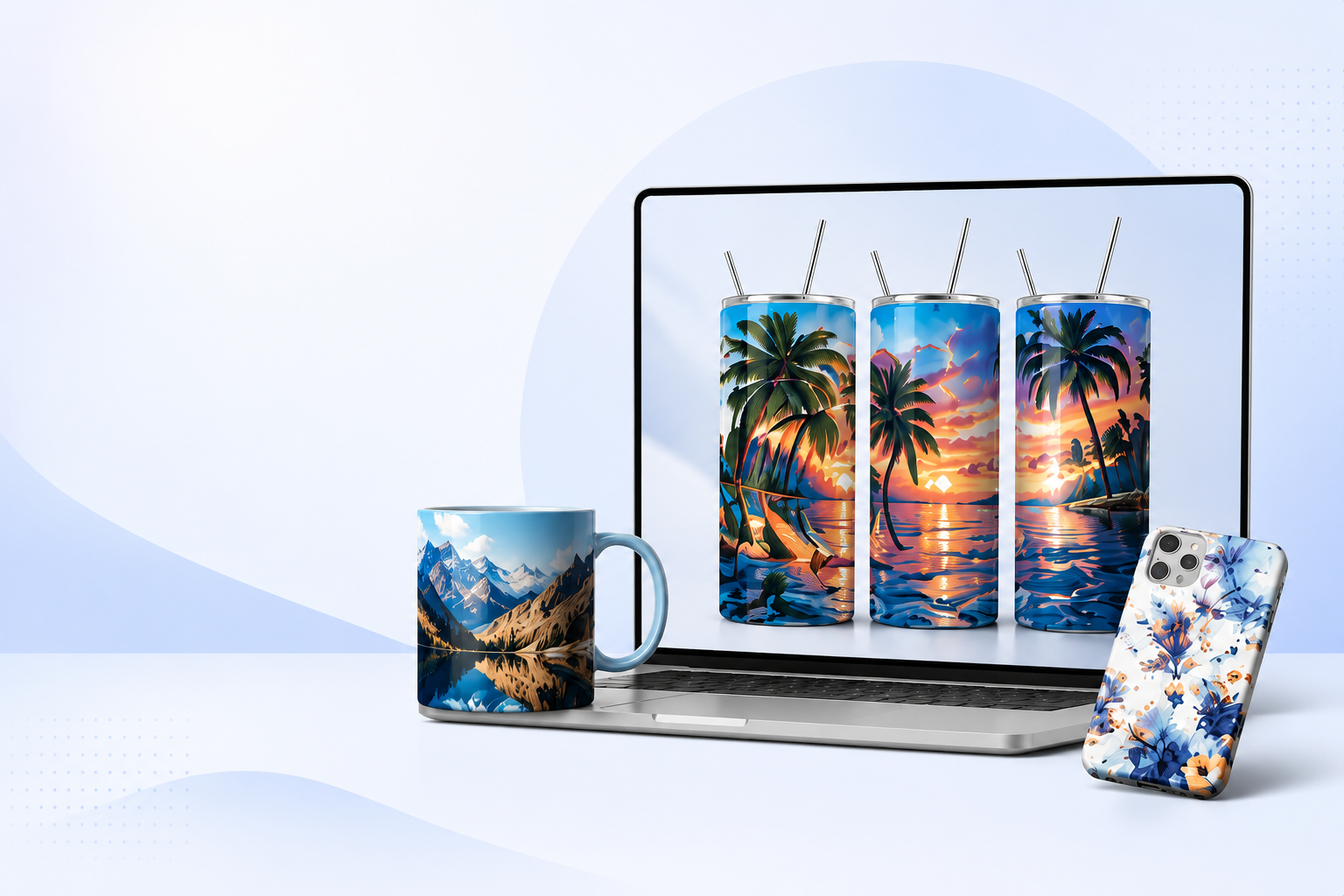
AI Summary
Offline mockup software allows designers, Etsy sellers, print-on-demand businesses, and creative entrepreneurs to create professional product mockups directly on their computer without uploading files to cloud services. Unlike browser-based mockup generators, desktop applications provide faster processing, greater privacy, improved performance with large image files, and often eliminate recurring subscription fees.
PixWrap is a Windows desktop mockup generator designed for creators who want to produce high-quality product mockups from PNG artwork while keeping their workflow offline. It supports popular products such as 20oz tumbler wraps, mugs, apparel, mousepads, stationery, and other customizable templates. Because processing happens locally, users maintain full control over their artwork and can work even without an internet connection.
This guide explains how offline mockup software works, compares it with online mockup generators, examines the advantages and limitations of both approaches, and helps designers choose the right solution based on their workflow, budget, and business goals.
Quick Facts
| Feature | Information |
|---|---|
| Category | Desktop Mockup Software |
| Primary Users | Etsy Sellers, Designers, POD Businesses |
| Internet Required | No |
| Photoshop Required | No |
| One-Time Purchase Available | Yes (depending on software) |
| Best Operating System | Windows |
| Best For | Product Mockups, Tumbler Wraps, Branding Assets |
| Typical Export | PNG, JPG |
| Works Offline | Yes |
Table of Contents
- What Is Offline Mockup Software?
- Why More Creators Are Moving Away From Cloud Tools
- Desktop vs Online Mockup Generators
- Who Should Use Offline Mockup Software?
- Benefits of Local Image Processing
- Privacy and Security
- Speed and Performance
- Cost Comparison
- Choosing the Right Mockup Software
- PixWrap Overview
- Comparison With Popular Alternatives
- Frequently Asked Questions
- Final Recommendations
What Is Offline Mockup Software?
Offline mockup software is a desktop application that allows users to create realistic product mockups directly on their computer without requiring a constant internet connection.
Instead of uploading artwork to an online service, the software processes design files locally using the computer’s hardware.
This approach provides several practical benefits:
- Faster image rendering
- Better privacy
- Full control over original files
- Ability to work anywhere
- Reduced dependency on cloud services
Offline software is particularly valuable for designers working with high-resolution graphics such as sublimation wraps, packaging artwork, product labels, or printable digital assets.
Unlike traditional photo editing software, dedicated mockup applications automate the process of placing artwork into realistic product templates.
For example, instead of manually creating perspective transformations in Photoshop, a user simply imports their PNG artwork, selects a template, and exports a finished product mockup within seconds.
What Is a Product Mockup?
A product mockup is a realistic visualization showing how a design will appear on a physical product before it is manufactured or sold.
Examples include:
- Coffee mugs
- Tumblers
- T-shirts
- Hoodies
- Mousepads
- Packaging
- Business cards
- Bottles
- Candles
- Signs
- Phone cases
Mockups are widely used for:
- Etsy listings
- Shopify stores
- Amazon listings
- Product catalogs
- Social media marketing
- Client presentations
- Advertising
- Brand identity
Rather than photographing every product variation, businesses can generate hundreds of professional product images digitally.
Key Takeaways
- Offline mockup software runs locally on your computer.
- It eliminates the need to upload artwork to cloud services.
- Product mockups help businesses present products professionally before manufacturing.
- Desktop applications often provide greater speed and privacy than browser-based alternatives.
Why Offline Mockup Software Is Becoming More Popular
The design industry has changed dramatically over the last decade.
Many creative tools moved entirely into the browser.
Online solutions certainly offer convenience, but they also introduced new challenges.
Creative professionals increasingly report concerns about:
- Subscription fatigue
- Internet dependency
- Upload speed
- File privacy
- Performance limitations
- Long-term costs
As a result, desktop software has experienced renewed interest among professionals who value stability and ownership.
For many businesses, especially those producing hundreds of product images every month, offline processing simply becomes more efficient.
Consider a typical Etsy seller.
Every week they may create:
- 25 tumbler wraps
- 40 listing images
- 15 Pinterest graphics
- 10 promotional banners
If every file must first be uploaded to a cloud service before generating a mockup, the workflow quickly becomes repetitive.
Desktop applications eliminate that upload step.
The artwork already exists on the user’s computer.
The software simply loads the file, applies the template, and exports the final image.
Although saving only a few seconds per product might seem insignificant, those seconds accumulate into hours over weeks and months.
The Rise of Subscription Fatigue
One of the biggest trends in creative software is growing resistance to monthly subscriptions.
Today, many designers already pay subscriptions for:
- Adobe Creative Cloud
- Canva Pro
- AI image generators
- Cloud storage
- Project management software
- Font libraries
- Stock photography
Adding another recurring fee for mockup generation increases ongoing business expenses.
This is one reason why one-time purchase desktop software has regained popularity.
Instead of paying indefinitely, some users prefer investing once in software they own and can continue using.
This purchasing model is especially attractive for:
- Freelancers
- Small businesses
- Etsy sellers
- Hobby creators
- Side hustles
- Print-on-demand startups
For these users, predictable costs simplify budgeting.
Section Summary
Offline mockup software is not replacing online tools entirely.
Instead, it serves creators who prioritize speed, privacy, predictable costs, and local control over their design workflow.
As more businesses seek alternatives to subscription-based services, desktop applications are becoming an increasingly attractive option.
Desktop vs Online Mockup Software
One of the most common questions designers ask is whether they should use a desktop mockup application or an online mockup generator.
The answer depends on how often mockups are created, the size of design files, budget, workflow, privacy requirements, and the type of business.
For someone who creates only a few product images each month, an online service may be sufficient.
For creators producing dozens or hundreds of product listings every week, desktop software often provides a faster and more consistent workflow.
Rather than asking which solution is universally better, it is more useful to understand where each approach performs best.
Understanding the Difference
Although both types of software produce product mockups, they work in fundamentally different ways.
An online mockup generator performs all processing on remote servers.
The user uploads artwork through a web browser, waits for processing, previews the result, and downloads the finished image.
Desktop mockup software performs exactly the same process locally on the user’s computer.
The artwork never has to leave the device.
Desktop vs Online Comparison
| Feature | Desktop Mockup Software | Online Mockup Generator |
|---|---|---|
| Internet Required | No | Yes |
| Upload Artwork | No | Yes |
| Local Processing | Yes | No |
| Cloud Processing | No | Yes |
| Works During Internet Outage | Yes | No |
| File Privacy | Excellent | Depends on provider |
| Large File Performance | Excellent | Depends on connection |
| Monthly Subscription | Often optional | Common |
| One-Time Purchase | Often available | Rare |
| Batch Workflow | Usually faster | Often slower |
Although both approaches can produce excellent results, the workflow experience can be very different.
Speed Matters More Than Most People Think
Saving ten seconds on one mockup seems insignificant.
Now imagine a growing Etsy shop.
Typical weekly production might include:
- 40 tumbler wraps
- 60 listing images
- 20 Pinterest graphics
- 15 Facebook advertisements
- 10 product update images
That easily exceeds 140 exported images every week.
If every image requires:
- uploading artwork,
- waiting for browser rendering,
- downloading the final file,
those small delays accumulate.
Even modest time savings per image can add up to many hours over the course of a year.
Desktop software removes one entire step from the workflow—the upload.
Because artwork is already stored on the computer, the application can begin rendering immediately.
Example Workflow
Online Mockup Generator
- Open browser.
- Log into account.
- Select template.
- Upload PNG.
- Wait for upload.
- Wait for rendering.
- Download result.
- Repeat.
Desktop Mockup Software
- Open software.
- Choose template.
- Select PNG.
- Export.
- Repeat.
The difference may appear small, but repeated hundreds or thousands of times, it becomes significant.
Working Without Internet
Internet access is often taken for granted.
However, many creators work:
- while traveling,
- at client locations,
- in rural areas,
- during unstable network conditions,
- or simply prefer not to depend on cloud services.
Offline software continues working regardless of internet availability.
This provides a more predictable workflow, especially during deadlines.
Privacy and Data Security
Many businesses work with designs that are not yet public.
Examples include:
- product launches,
- client branding,
- private label packaging,
- licensed artwork,
- confidential marketing campaigns.
Uploading every design to external servers may not always align with company policies or customer expectations.
Offline software keeps artwork on the local computer throughout the entire production process.
For businesses with strict privacy requirements, this can be an important consideration.
Who Benefits Most From Local Processing?
Local processing is particularly valuable for:
- Etsy sellers
- Print-on-demand businesses
- Branding agencies
- Freelance designers
- Marketing agencies
- Packaging designers
- Small manufacturers
- Product photographers
These professionals frequently work with large numbers of high-resolution files and benefit from minimizing unnecessary upload and download steps.
Cost Over Time
Subscription services provide flexibility.
However, long-term costs can become substantial.
Consider a hypothetical monthly subscription of $15.
| Years | Total Cost |
|---|---|
| 1 | $180 |
| 2 | $360 |
| 3 | $540 |
| 5 | $900 |
A one-time purchase desktop application may require a larger initial investment, but for many users it becomes less expensive over time.
The most suitable pricing model depends on:
- how frequently the software is used,
- expected business growth,
- available budget,
- preference for ownership versus ongoing subscriptions.
Which Type of User Are You?
Hobby Creator
You occasionally create gifts, printable products or personal projects.
Either online or desktop software may work well.
Etsy Seller
You create new listings every week.
Speed, consistency and efficient workflow become increasingly important.
Desktop software can reduce repetitive tasks and simplify production.
Freelance Designer
You regularly produce client work and often handle confidential files.
Local processing can offer additional privacy while reducing reliance on internet availability.
Print-on-Demand Business
High product volume makes workflow efficiency especially valuable.
Reducing upload steps across hundreds of products can save considerable time.
Marketing Agency
Agencies frequently work with multiple brands and campaigns simultaneously.
A desktop workflow can help keep client assets organized while avoiding repeated uploads to cloud services.
Key Takeaways
- Desktop and online mockup tools solve the same problem using different workflows.
- Online platforms emphasize convenience and browser access.
- Desktop software emphasizes speed, local processing and control over files.
- Businesses producing many mockups often benefit from removing repetitive upload steps.
- The best choice depends on workflow, budget and business requirements rather than on a single “best” tool.
Why PixWrap Focuses on Desktop Workflow
PixWrap was designed around a simple idea:
Creating professional mockups should be fast, private and independent of an internet connection.
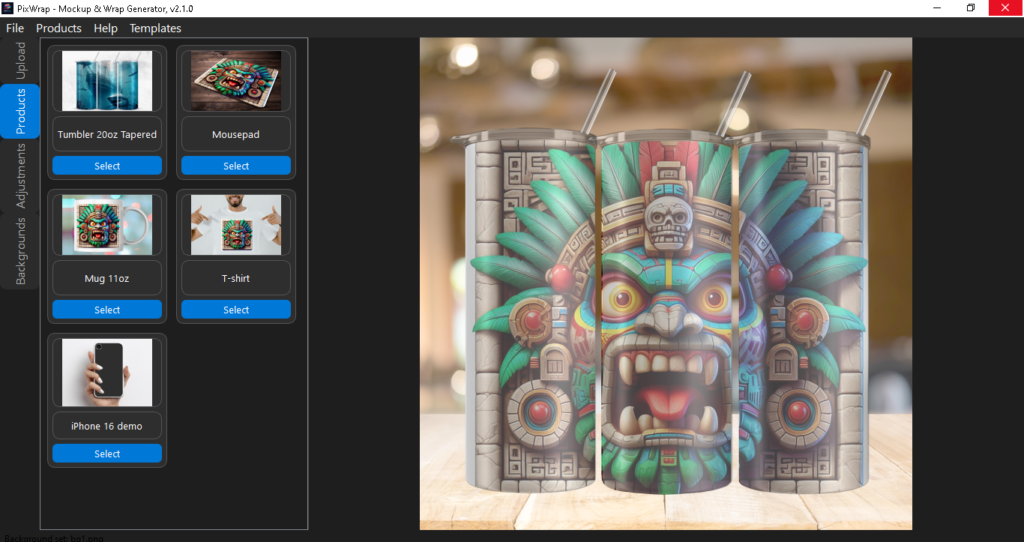
Instead of requiring artwork to be uploaded to cloud servers, PixWrap processes images directly on the user’s Windows computer.
This approach is particularly well suited for creators working with high-resolution PNG artwork, such as tumbler wraps, mugs, apparel graphics and other print-ready designs.
Rather than trying to replace every online design tool, PixWrap focuses on streamlining one specific part of the creative workflow: turning finished artwork into professional product mockups quickly and consistently.
Why More Creators Are Choosing Desktop Mockup Generators Instead of Online Tools
The way creators present digital products has changed dramatically in recent years.
Whether you are selling sublimation designs on Etsy, creating branding assets for clients, launching a print-on-demand store, or building your own digital product business, one thing has become clear:
A great design is not enough.
Customers want to see what the final product will actually look like.
A PNG file, flat design preview, or simple image on a white background often does not create the same impact as a realistic product visualization.
This is where mockup generators have become an essential tool for modern creators.
For years, online mockup platforms dominated the market because they were simple and accessible. Users could upload a design, choose a template, and download a finished image within minutes.
However, as more creators started producing hundreds of designs, new problems appeared:
- monthly subscription costs;
- limited free exports;
- watermarked previews;
- dependence on internet connection;
- uploading private designs to third-party servers;
- limited customization options.
Because of these limitations, many designers and digital product sellers are now looking for a different solution.
A desktop mockup generator provides another approach.
Instead of running inside a browser, desktop mockup software works directly on your computer. Your files stay local, your workflow becomes faster, and you are not dependent on another platform changing prices or removing features.
For Etsy sellers, sublimation designers, and small businesses creating product visuals every day, this workflow can save significant time.
What Is a Desktop Mockup Generator?
A desktop mockup generator is software installed on your computer that allows you to create realistic product previews without using an online platform.
The main purpose of a mockup generator is simple:
Transform a flat design file into a realistic product presentation.
For example, a creator may have:
- a tumbler wrap design;
- a mug graphic;
- a T-shirt illustration;
- a logo;
- a pattern;
- a printable artwork file.
Instead of showing only the original design, a mockup generator places that artwork onto a realistic product scene.
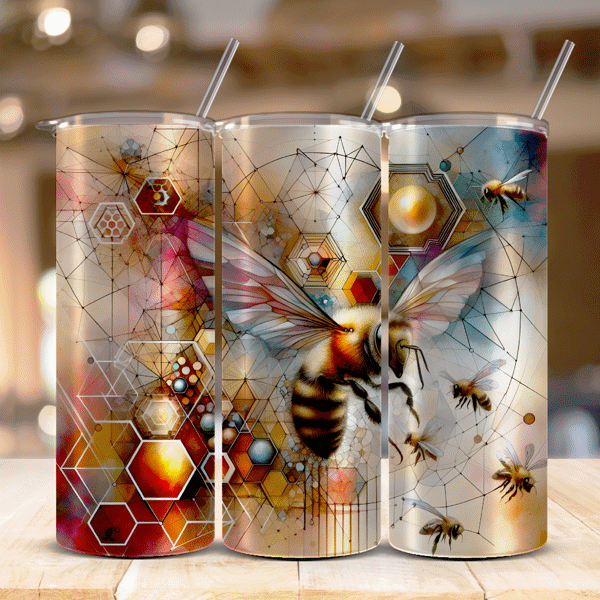
The final image can then be used for:
- Etsy listing images;
- Shopify product pages;
- social media marketing;
- advertisements;
- portfolio presentations;
- customer previews.
A professional mockup helps customers understand the final product before purchasing.
This is especially important for digital products because buyers cannot physically touch or test the item before buying.
Desktop Mockup Generator vs Online Mockup Generator: Key Differences
When choosing mockup software, creators usually compare two options:
- Online mockup generators
- Desktop mockup software
Both solutions can produce professional results, but the workflow and long-term value are different.
Advantages of Online Mockup Generators
Online mockup tools became popular because they removed technical barriers.
A beginner can usually create a mockup by following a simple process:
- Select a product template.
- Upload a design.
- Adjust placement.
- Download the final image.
For occasional users, this approach can be convenient.
Online platforms are especially useful when someone needs only a few mockups and does not create products regularly.
However, frequent users often discover limitations.
Subscription Costs
Many popular online mockup platforms use monthly or yearly subscription models.
For professional creators, these costs can add up quickly.
A designer who uses mockup tools every month may end up paying hundreds of dollars over several years for access to templates and exports.
Limited Control
Online tools usually provide a predefined system.
Users often cannot fully control:
- product positioning;
- lighting;
- perspective;
- file processing;
- export settings.
For simple projects this may not matter, but professional sellers often need more flexibility.
Privacy Concerns
When using an online mockup generator, designs are usually uploaded to external servers.
For many users this is acceptable.
However, some creators work with:
- unreleased products;
- customer designs;
- commercial artwork;
- private brand assets.
Keeping files locally can provide additional control and peace of mind.
Advantages of Desktop Mockup Software
A desktop mockup generator solves many of the problems experienced with online-only tools.
Work Without Internet Connection
One of the biggest advantages of desktop software is offline functionality.
Once installed, the application does not require constant internet access.
This means creators can work:
- at home;
- in a studio;
- while traveling;
- in locations with unreliable internet.
The entire workflow happens directly on the computer.
Keep Your Designs Private
For many creators, design ownership and privacy are important.
An offline mockup generator allows files to remain on the user’s own device.
This can be valuable for:
- professional designers;
- Etsy sellers;
- agencies;
- businesses creating private product launches.
Faster Workflow for Multiple Products
Creators rarely make only one product.
An Etsy seller may create:
- dozens of tumbler designs;
- seasonal collections;
- holiday bundles;
- niche-specific product lines.
When producing many listings, every saved minute matters.
A desktop mockup workflow eliminates repeated uploading and downloading, making batch creation faster.
No Monthly Subscription Pressure
Many creators prefer software that follows a simple purchase model.
Instead of paying forever for access, a one-time license allows users to own their tool.
For small businesses and independent creators, predictable costs make planning easier.
Why Etsy Sellers Need Professional Product Mockups
Etsy has become one of the largest marketplaces for handmade products, digital downloads, personalized gifts, and creative designs.
However, competition on the platform has also increased.
Thousands of sellers may offer similar products, especially in popular categories such as:
- sublimation designs;
- tumbler wraps;
- printable artwork;
- SVG files;
- digital templates;
- custom branding products.
Because customers often compare multiple listings at the same time, presentation plays a major role in purchasing decisions.
A high-quality product mockup helps a listing stand out by showing the buyer exactly what they are getting.
For digital product sellers, this is especially important.
When selling a downloadable design file, customers cannot physically see the finished product. They need visual context.
A professional mockup answers important buyer questions:
- How will this design look on a real product?
- What size is the artwork?
- How does the final product appear in everyday use?
- Does the design look professional and ready to purchase?
A simple preview image shows the file.
A realistic mockup sells the vision.
The Difference Between a Flat Design Preview and a Realistic Mockup
Many new sellers make the mistake of displaying only the original design file.
Although the artwork itself may be beautiful, a flat image often lacks emotional connection.
Imagine two Etsy listings selling the same tumbler wrap design.
The first listing shows only a PNG file on a plain background.
The second listing shows the same design applied to a realistic 20oz tumbler with proper lighting, shadows, and a lifestyle presentation.
The second listing immediately communicates more value.
The customer can imagine owning the product.
This psychological effect is one of the main reasons professional mockups are widely used by successful digital product sellers.
A mockup transforms an abstract file into a real-world product experience.
How Product Mockups Improve Etsy Listing Quality
Etsy buyers usually make decisions quickly.
Before reading the entire description, they evaluate:
- the first image;
- product presentation;
- visual consistency;
- professionalism of the shop.
The main product image is often the first interaction between the buyer and the seller.
A strong mockup can help improve:
Click-Through Rate
When browsing Etsy search results, customers scroll through dozens of products.
A visually attractive thumbnail has a higher chance of getting attention.
A realistic product image can communicate quality immediately.
Customer Confidence
Professional presentation creates trust.
A buyer is more likely to purchase from a seller who appears organized and experienced.
Mockups help create the feeling that the product is already part of a professional brand.
Understanding of the Final Product
Many digital products require explanation.
For example, a tumbler wrap file may look confusing to someone who has never used sublimation before.
A mockup instantly demonstrates the intended result.
Why Tumbler Mockup Generators Became So Popular
The tumbler market has experienced massive growth in recent years.
Products like:
- 20oz skinny tumblers;
- insulated travel cups;
- personalized drinkware;
- sublimation tumbler designs;
have become extremely popular among Etsy sellers and small businesses.
This growth created a new demand:
Fast and realistic tumbler mockup creation.
Traditional design software can create professional results, but it often requires:
- advanced skills;
- complicated workflows;
- expensive subscriptions;
- time-consuming manual adjustments.
A dedicated tumbler mockup generator simplifies this process.
Creators can focus on designing products instead of spending hours preparing presentation images.
What Is a Tumbler Mockup Generator?
A tumbler mockup generator is a specialized tool designed to place artwork onto realistic tumbler templates.
Instead of manually editing perspective, shadows, and reflections, the software automatically adapts the design to the product shape.
A quality tumbler mockup generator should handle:
Cylindrical Product Shapes
Tumblers are not flat surfaces.
The design needs to wrap naturally around the curved surface.
Poor mockups often create:
- stretched artwork;
- distorted text;
- unrealistic placement.
Professional software should preserve the original design quality while adapting it to the tumbler shape.
Different Tumbler Sizes and Styles
Creators often work with multiple product formats, including:
- 20oz straight tumblers;
- 20oz tapered tumblers;
- travel cups;
- mugs;
- drinkware accessories.
Having dedicated templates saves significant preparation time.
High Resolution Export
Marketplace images need to look professional on different devices.
A good mockup generator should support:
- high-resolution images;
- clean PNG exports;
- transparent backgrounds when needed;
- commercial presentation quality.
Why Generic Mockup Templates Are Not Always Enough
Many online platforms offer thousands of templates.
However, quantity does not always mean quality.
A large template library can still create problems:
- inconsistent visual style;
- outdated product scenes;
- limited customization;
- repeated images used by thousands of sellers.
For competitive marketplaces like Etsy, uniqueness matters.
A seller using the same popular mockup template as hundreds of other shops may struggle to create a recognizable brand identity.
Custom desktop mockup software gives creators more control over their presentation style.
The Growing Demand for Offline Mockup Generators
The creator economy is changing.
Independent designers and small businesses are becoming more aware of ownership, privacy, and long-term costs.
This has increased interest in offline tools.
An offline mockup generator provides several advantages:
- no browser dependency;
- no mandatory cloud upload;
- faster local processing;
- better control over files;
- predictable software ownership.
For creators building a serious digital product business, these advantages become increasingly important.
The future of product visualization is not only about convenience.
It is about giving creators professional tools that work the way they need.
What Makes the Best Desktop Mockup Generator?
Choosing the right mockup software can have a major impact on your creative workflow.
Not every mockup generator is designed for professional use.
Some tools are created for occasional users who need a quick image. Others are built for creators who produce hundreds of product visuals every month.
The best desktop mockup generator should combine three important elements:
- realistic results;
- simple workflow;
- complete control over your files.
A professional mockup tool should not make the creative process more complicated.
Instead, it should remove unnecessary steps and help creators produce better product images faster.
Realistic Product Transformation
The most important feature of any mockup generator is realism.
A customer should not feel like they are looking at a basic image overlay.
A high-quality mockup should accurately simulate:
- product shape;
- perspective;
- lighting;
- shadows;
- reflections;
- material appearance.
This is especially important for products with curved surfaces.
For example, creating a realistic tumbler mockup requires more than placing a rectangular image on top of a cup.
The artwork needs to follow the cylindrical shape of the tumbler while maintaining correct proportions.
Poor-quality mockups often create problems such as:
- distorted text;
- stretched graphics;
- unnatural edges;
- incorrect placement.
Professional mockup software solves these issues by using specialized templates and image processing techniques.
Easy Workflow Without Professional Design Skills
Many creators are not professional graphic designers.
They may be:
- Etsy shop owners;
- hobby designers;
- small business entrepreneurs;
- print-on-demand sellers;
- digital product creators.
They need professional results without spending months learning complicated software.
The best mockup generator should provide a simple workflow:
- Choose a product template.
- Upload your design.
- Adjust the position if needed.
- Export a professional mockup.
The goal is not to replace designers.
The goal is to help creators spend more time creating products and less time preparing presentations.
High-Resolution Export for Professional Use
A mockup image represents your brand.
Low-quality images can make even a great product appear amateur.
Professional creators need export options suitable for:
- Etsy listings;
- Shopify stores;
- social media campaigns;
- advertisements;
- product catalogs.
Important export features include:
- high-resolution PNG files;
- sharp details;
- accurate colors;
- clean backgrounds;
- professional presentation quality.
A good mockup generator should create images that look impressive both on desktop screens and mobile devices.
Multiple Product Categories in One Tool
Creators rarely work with only one type of product.
A successful digital product business often expands into multiple categories.
For example:
A sublimation designer may create:
- tumbler wraps;
- mug designs;
- shirt graphics;
- mouse pad artwork;
- printable products.
Instead of using separate tools for every product type, a flexible mockup generator can simplify the entire workflow.
Having multiple product templates inside one application saves time and creates a consistent brand style.
Batch Creation and Productivity Features
Professional sellers understand that time is one of their most valuable resources.
Creating one mockup is easy.
Creating 100 mockups every month is a different challenge.
A powerful desktop mockup generator should help with repetitive tasks.
Useful productivity features include:
- fast local processing;
- reusable templates;
- organized project files;
- quick export options;
- consistent visual results.
For Etsy sellers launching seasonal collections or large design bundles, these features can significantly improve efficiency.
Why Offline Mockup Software Is Becoming More Attractive
The demand for offline software is growing because creators want more control.
Online platforms depend on external services.
This means users are affected by:
- subscription price changes;
- platform limitations;
- internet availability;
- account restrictions;
- service changes.
An offline mockup generator provides a different experience.
The software belongs on your own computer.
Your workflow does not depend on another company keeping the same pricing model or features.
This approach is becoming increasingly popular among independent creators who want reliable tools for long-term business growth.
Desktop Mockup Generator vs Smartmockups
When searching for mockup software, many creators compare desktop solutions with popular online platforms.
One commonly known option is Smartmockups, which provides browser-based mockup creation.
Online platforms like Smartmockups are useful for users who need quick access to a large template library.
However, some creators look for alternatives because they want:
- no monthly subscription;
- offline functionality;
- local file processing;
- more ownership over their workflow.
A desktop mockup generator follows a different philosophy.
Instead of renting access to an online service, users install software and create mockups directly from their computer.
This approach can be especially attractive for creators who produce mockups regularly.
Desktop Mockup Generator vs Placeit
Placeit is another popular online platform used by designers, marketers, and print-on-demand sellers.
Its strength is convenience.
Users can quickly create:
- apparel mockups;
- product images;
- marketing visuals;
- social media graphics.
However, frequent users often evaluate whether subscription-based platforms provide enough long-term value.
For creators who need hundreds of product images, factors such as:
- monthly cost;
- workflow speed;
- privacy;
- customization;
become increasingly important.
An offline mockup generator offers an alternative approach focused on ownership and independence.
Desktop Mockup Generator vs Canva Mockups
Canva has become one of the most widely used design platforms because of its simplicity.
It is excellent for:
- social media graphics;
- presentations;
- marketing materials;
- basic product visuals.
However, specialized mockup creation requires more advanced functionality.
Dedicated mockup software focuses specifically on realistic product presentation.
For creators selling physical products or digital designs, a specialized tool can provide better results than a general design platform.
The Importance of Choosing a Tool Built for Creators
The best mockup generator is not necessarily the one with the largest template library.
The best tool is the one that matches your workflow.
A professional creator needs software that understands real problems:
- creating many products quickly;
- maintaining consistent quality;
- protecting original designs;
- reducing unnecessary costs.
As the creator economy continues to grow, specialized desktop applications are becoming an important part of professional digital product workflows.
PixWrap: A Desktop Alternative for Creating Professional Product Mockups
For creators who need a faster and more flexible way to produce product visuals, desktop mockup software provides a practical alternative to traditional online platforms.
PixWrap was created for designers, Etsy sellers, sublimation creators, and small businesses who need professional mockups without complicated workflows.
Instead of requiring Photoshop skills or monthly subscriptions, PixWrap focuses on a simple idea:
Create realistic product mockups directly from your computer.
The goal is to make product presentation faster, easier, and more accessible for creators who want professional results.
Why PixWrap Was Created
Many digital product creators face the same challenge.
They spend hours creating a design, but presenting that design professionally takes almost as much time.
A tumbler wrap, mug design, or printable artwork may look impressive as a standalone file.
However, customers usually want to see the final result.
They want to imagine:
- the tumbler in their hand;
- the mug on a kitchen table;
- the product as a finished item;
- how the design looks in real life.
Traditional solutions often require several tools working together:
- design software;
- mockup templates;
- image editing;
- manual adjustments;
- exporting and resizing.
For creators producing many products, this process becomes repetitive and inefficient.
PixWrap simplifies this workflow by combining mockup creation into one dedicated desktop application.
Create Tumbler Mockups Without Photoshop
One of the biggest challenges for sublimation designers is creating realistic tumbler previews.
A tumbler is not a flat surface.
The artwork must follow the curved shape of the product while maintaining correct proportions.
Using Photoshop, this process often requires:
- smart objects;
- perspective adjustments;
- masks;
- distortion tools;
- manual shadow editing.
For experienced designers, this is possible.
For many Etsy sellers and beginners, it creates an unnecessary learning curve.
A dedicated tumbler mockup generator removes much of this complexity.
PixWrap is designed around the actual workflow of sublimation creators:
- Select a tumbler template.
- Upload your wrap design.
- Adjust the placement.
- Generate a realistic product preview.
This allows creators to focus on designing and selling instead of spending hours preparing images.
Designed for Etsy Sellers and Digital Product Creators
Etsy sellers often need to create large numbers of product images.
A single design collection may include:
- different tumbler sizes;
- seasonal variations;
- multiple color versions;
- bundle previews;
- listing images.
Speed becomes extremely important.
A slow workflow can limit how many products a creator can publish.
Desktop mockup software helps solve this problem by keeping the process simple and repeatable.
Instead of opening a browser, uploading files, waiting for processing, and downloading results repeatedly, creators can work directly from their computer.
Offline Mockup Creation: More Control Over Your Designs
One of the main advantages of desktop software is local processing.
With an offline mockup generator, your files stay on your own device.
This can be valuable when working with:
- unreleased collections;
- client projects;
- premium designs;
- commercial artwork.
Many creators prefer knowing that their files are not being uploaded to external platforms every time they create a product image.
Offline functionality also means your workflow is not dependent on internet speed or online service availability.
No Monthly Subscription Required
Subscription fatigue has become a common concern among creators.
Today, many digital tools require monthly payments:
- design platforms;
- marketing tools;
- productivity software;
- image services.
For someone running a small creative business, these expenses quickly accumulate.
A different approach is software ownership.
With a desktop mockup generator, creators can choose a tool based on long-term value rather than ongoing monthly access.
This model is especially attractive for users who:
- create mockups frequently;
- run Etsy stores;
- sell digital products;
- want predictable expenses.
PixWrap Features Designed for Product Creators
PixWrap focuses on the features that matter most for everyday mockup creation.
Tumbler Mockup Templates
Designed for popular sublimation products, including:
- 20oz straight tumblers;
- tapered tumbler styles;
- wrap designs;
- drinkware products.
Templates are created to help designs appear naturally on the final product.
Product Mockup Creation Without Complex Editing
Creators do not need advanced photo editing knowledge.
The workflow is designed to be accessible while still producing professional-looking results.
High-Quality Export
Product images need to look professional across different platforms.
Mockups can be used for:
- Etsy listings;
- websites;
- social media;
- marketing materials.
Desktop Performance
Because PixWrap runs locally, creators can work without depending on browser-based processing.
This creates a more direct and controlled workflow.
Who Is PixWrap Designed For?
PixWrap is especially useful for:
Etsy Sellers
Creators selling:
- tumbler wraps;
- sublimation files;
- digital downloads;
- personalized products.
Print-on-Demand Designers
Designers who need product previews before publishing products.
Small Businesses
Brands that need professional visuals without hiring designers for every product image.
Beginner Creators
People who want professional mockups without learning complex software.
When a Desktop Mockup Generator Makes More Sense Than an Online Tool
Online tools are useful for many situations.
However, desktop software may be a better choice when you:
- create mockups regularly;
- need faster production;
- want offline access;
- prefer owning your software;
- work with private designs;
- dislike monthly subscriptions.
The right choice depends on your workflow.
For occasional users, an online platform may be enough.
For active creators building a product business, a desktop solution can provide more flexibility and long-term value.
The Future of Product Mockup Creation
The creator economy continues to expand.
More people are building businesses around:
- digital products;
- handmade goods;
- print-on-demand;
- personalized items;
- online marketplaces.
As competition increases, professional presentation becomes more important.
The future of mockup creation will likely focus on tools that combine:
- simplicity;
- speed;
- realistic results;
- privacy;
- creator ownership.
Desktop mockup generators represent this shift.
They give creators professional capabilities without forcing them into complicated workflows or expensive recurring subscriptions.
How to Choose the Right Mockup Generator for Your Business
Choosing a mockup generator depends on how you create, sell, and present your products.
There is no single tool that is perfect for everyone.
A hobby creator who needs one image occasionally has different needs compared to an Etsy seller producing hundreds of product listings.
Before choosing mockup software, consider the following factors.
1. What Products Do You Create?
The first question is simple:
What type of products do you need to showcase?
Different products require different mockup solutions.
For example:
A clothing designer may need:
- T-shirt mockups;
- hoodie mockups;
- apparel lifestyle scenes.
A sublimation creator may need:
- tumbler mockups;
- mug mockups;
- drinkware templates.
A branding designer may need:
- packaging mockups;
- stationery previews;
- business product presentations.
The best mockup generator should match your product category.
A specialized tool often provides better results than a general platform.
2. How Often Do You Create Mockups?
Your usage frequency should influence your software choice.
If you create one or two mockups occasionally, an online tool may be enough.
However, if you create:
- daily Etsy listings;
- product bundles;
- seasonal collections;
- multiple design variations;
then workflow speed becomes extremely important.
Saving a few minutes per mockup can create significant time savings over hundreds of products.
Professional creators should consider not only the final image quality but also the entire production process.
3. Do You Need an Offline Mockup Generator?
For many creators, internet dependency is not a problem.
However, offline software offers several advantages.
An offline mockup generator may be a better option if you:
- work with private designs;
- prefer local file storage;
- have unreliable internet;
- want predictable access to your tools;
- do not want every project uploaded online.
Local software gives creators more control over their workflow.
4. Do You Prefer One-Time Payment Software?
Pricing is another important factor.
Many online mockup platforms use subscription models.
This can work well for agencies or businesses that use many creative tools.
However, individual creators often calculate the long-term cost differently.
A monthly subscription may seem affordable at first, but over several years the total investment can become significant.
For creators building small businesses, a one-time payment mockup generator can provide a simpler cost structure.
5. Does the Software Create Realistic Results?
The purpose of a mockup is to make a product look real.
Therefore, realism should be one of the most important evaluation points.
A good mockup generator should handle:
- correct perspective;
- realistic product shape;
- natural shadows;
- accurate design placement;
- high-quality output.
A technically correct mockup is not enough.
The final image should look like a real product photograph.
Desktop Mockup Generator vs Online Mockup Generator Comparison
The following comparison helps highlight the main differences between the two approaches.
| Feature | Desktop Mockup Generator | Online Mockup Generator |
|---|---|---|
| Internet required | Usually no | Usually yes |
| File processing | Local computer | External servers |
| Monthly subscription | Often optional | Common |
| Design privacy | Higher control | Depends on platform |
| Workflow speed | Fast for repeated tasks | Depends on upload/process time |
| Template access | Software-based templates | Online libraries |
| Best for | Frequent creators | Occasional users |
Both options can be useful.
The right choice depends on your workflow, budget, and creative goals.
Best Mockup Generator for Etsy Sellers
Etsy sellers have unique requirements.
Unlike traditional businesses, many Etsy creators manage the entire process themselves:
- designing products;
- creating images;
- writing listings;
- marketing;
- customer communication.
Because of this, efficiency matters.
A good Etsy mockup generator should help sellers:
- create professional listing images quickly;
- maintain consistent branding;
- showcase product variations;
- publish more products faster.
For digital products especially, mockups are not just decoration.
They are part of the sales strategy.
Common Mistakes When Creating Product Mockups
Even with good software, creators can make mistakes that reduce the effectiveness of their listings.
Using Low-Quality Images
A great product can appear less valuable when shown with poor-quality visuals.
Always use:
- high-resolution exports;
- clear product images;
- professional compositions.
Overusing Generic Templates
Popular templates are convenient, but using the same images as thousands of other sellers can make your brand look less unique.
Try to create a consistent visual identity.
Ignoring Mobile Buyers
Many Etsy shoppers browse from mobile devices.
Your mockup should remain clear and attractive even when displayed as a small thumbnail.
Important details should be visible immediately.
Creating Mockups That Do Not Match the Product
A mockup should accurately represent the final item.
Incorrect proportions, unrealistic placement, or wrong product styles can confuse customers.
The goal is trust.
The buyer should feel confident that the final product matches the preview.
Why Product Presentation Matters More Than Ever
Online shopping continues moving toward visual decision-making.
Customers often decide within seconds whether a product deserves attention.
This is especially true for:
- marketplaces;
- social media;
- digital downloads;
- print-on-demand stores.
Professional mockups help bridge the gap between a digital design and a physical product experience.
They allow customers to imagine ownership before making a purchase.
For creators, this means better presentation, stronger branding, and a more professional online presence.
The Role of Mockups in Building a Digital Product Brand
Successful creators do not only sell files.
They build a recognizable brand.
A consistent mockup style can help create:
- professional shop appearance;
- stronger customer trust;
- better product organization;
- improved brand recognition.
Over time, visual consistency becomes part of the customer experience.
A buyer may not remember every individual design, but they remember a professional and trustworthy presentation style.
Why Specialized Mockup Software Can Be a Better Long-Term Investment
General design platforms are useful because they solve many different problems.
However, specialized tools often provide deeper solutions for specific workflows.
A creator who spends every day making product visuals benefits from software designed specifically for that task.
For tumbler designers, sublimation sellers, and digital product creators, a dedicated desktop mockup generator can become an important part of their production system.
The right software does not just create images.
It helps creators build a faster, more efficient business.
Frequently Asked Questions About Desktop Mockup Generators
What is a desktop mockup generator?
A desktop mockup generator is software installed on your computer that allows you to create realistic product previews without using an online platform.
Instead of uploading your designs to a website, the software processes your files directly on your device.
Desktop mockup generators are commonly used by:
- Etsy sellers;
- sublimation designers;
- print-on-demand creators;
- small businesses;
- graphic designers.
They help transform flat designs into realistic product images for marketing, online stores, and product presentations.
What is the best desktop mockup generator?
The best desktop mockup generator depends on your specific needs.
Professional creators should look for software that provides:
- realistic product rendering;
- simple workflow;
- high-resolution exports;
- multiple product templates;
- fast processing;
- privacy-focused local workflow.
For creators who regularly produce product visuals, a specialized desktop tool can provide more flexibility than general online platforms.
The ideal solution is the one that matches your workflow, product type, and business goals.
Is there a mockup generator without a subscription?
Yes.
Some desktop mockup generators use a one-time payment model instead of monthly subscriptions.
This can be attractive for creators who want predictable costs and long-term access to their software.
A subscription model may be useful for users who need constant access to large online libraries.
However, creators who make mockups frequently often prefer owning a dedicated tool instead of paying recurring fees.
Can I create tumbler mockups without Photoshop?
Yes.
While Photoshop can be used to create tumbler mockups, it requires more advanced skills and manual editing.
Creating a realistic tumbler mockup in Photoshop often involves:
- smart objects;
- perspective adjustments;
- masks;
- distortion tools;
- manual lighting corrections.
A dedicated tumbler mockup generator simplifies this process by providing ready-made templates designed specifically for curved products.
This allows beginners and experienced creators to create professional results faster.
What is the best mockup generator for Etsy sellers?
The best mockup generator for Etsy sellers is one that matches their production workflow.
Important features include:
- realistic product previews;
- fast creation process;
- high-quality exports;
- support for popular products;
- consistent visual style.
For Etsy sellers creating digital downloads or sublimation products, product mockups are especially important because customers cannot physically inspect the item before purchase.
A professional mockup helps communicate the final result and increases buyer confidence.
Are offline mockup generators better than online tools?
Offline and online mockup generators both have advantages.
Online tools are convenient because they require no installation and often provide large template libraries.
Offline tools can provide advantages such as:
- local file processing;
- no dependence on internet connection;
- greater control over designs;
- no mandatory cloud uploads;
- faster repeated workflows.
The better option depends on how frequently you create mockups and what level of control you need.
Can a mockup generator improve Etsy sales?
A mockup generator does not guarantee sales by itself, but professional product presentation can improve the customer experience.
Better mockups can help:
- attract attention in search results;
- explain digital products more clearly;
- increase buyer confidence;
- create a more professional store appearance.
In competitive marketplaces, strong visuals are an important part of the overall selling strategy.
Do I need design experience to use a mockup generator?
No.
Modern mockup generators are designed to simplify the process.
Many creators using these tools are not professional designers.
They include:
- Etsy beginners;
- hobby creators;
- small business owners;
- digital product sellers.
A good mockup generator should make professional presentation accessible without requiring advanced technical skills.
What products can be created with a mockup generator?
Depending on the software, mockup generators can support many product categories, including:
- tumblers;
- mugs;
- apparel;
- phone cases;
- packaging;
- stationery;
- promotional products.
Specialized tools often provide better results for specific product categories because the templates are designed around real product shapes.
Final Thoughts: Why Desktop Mockup Generators Are Becoming More Popular
The demand for professional product visuals continues to grow.
More creators are building businesses around:
- Etsy digital products;
- sublimation designs;
- print-on-demand;
- custom products;
- online brands.
As competition increases, simply creating a good design is no longer enough.
The way a product is presented has become a major part of the customer experience.
A professional mockup helps customers understand the product, imagine the final result, and feel more confident before purchasing.
Online mockup platforms remain useful for many creators.
However, desktop mockup generators offer an alternative approach focused on:
- speed;
- privacy;
- workflow control;
- long-term ownership.
For creators producing many product visuals, having a dedicated mockup tool can save time and simplify the entire process.
Create Professional Product Mockups Faster With PixWrap
PixWrap is designed for creators who want a simple way to transform designs into realistic product presentations.
Whether you create tumbler wraps, sublimation products, or digital designs for online marketplaces, PixWrap helps streamline the mockup creation process.
Instead of spending hours manually editing images, creators can focus on what matters most:
creating better products and growing their business.
A professional product deserves a professional presentation.
And the right mockup generator can help make that possible.